EMI World Pro.
A queue buster checkout solution for customers and outreach expansion platform for retailers and brands. Set to launch for 12 tier 1 & 2 cities across 5+ popular retailers. Projected direct consumer traffic of 20 Mn.+, for the first time in offline market of Pine Labs.
02, Context
Problem Space
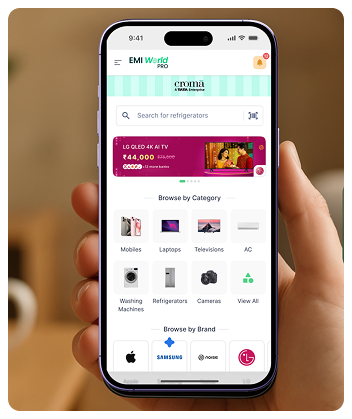
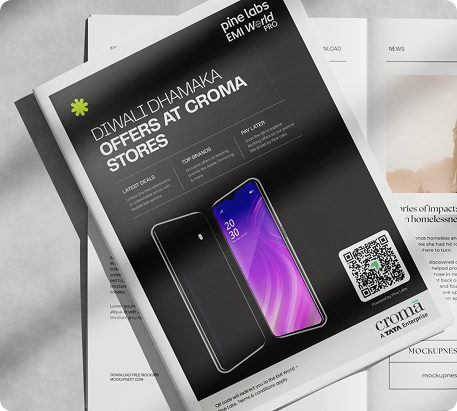
Need for a dynamic channel that allows our partner retailers and brands to bring in direct customer reach to in-store shopping was imminent for a long time.
EMI World mobile app was built for store agents. Every design decision in it assumed the person holding the phone was a trained retail employee standing inside a store.
The problem is that the decision to buy on EMI doesn't happen only at the POS. It happens earlier, at home, the night before, when someone is comparing a 24-month scheme on a TV they've been watching for three months. Or in the car on the way to the store, when they want to know exactly which card to carry.
The existing product's architecture is B2B-native
The architecture had to be re-entered from a different front door. Here the flow is not directed but more intent and exploration driven.
The conversion moment is distributed
A customer browsing from home might spend three days on a decision. The product needed to support both, low-friction exploration for the researcher, and a fast-close path for the customer already in the store.
Merchants need qualified leads, not just traffic
A customer who saves a plan, requests a callback, or generates a purchase QR is a warm lead with product and plan intent attached. The D2C surface had to be designed as a lead-generation engine, not just a catalog browser.
03, Constraints
Stakeholder Needs
Controlled Rollout
Not open access, Phase 1 launches in 8 metro cities: Delhi, Bengaluru, Mumbai, Kolkata, Chennai, Pune, Ahmedabad, Jaipur, with a curated list of LFR.
MVP login friction
To be tackled tactically by nudging the customer to login yet not hindering the browsing experience and taking the action upon intent.
DPDP Act '23 compliance
Any PII collected, name, gender, profile picture, mobile number, must be encrypted in transit and at rest. Users must be able to permanently delete their data.
Reducing retail-centric patterns
To avoid confusing customers yet solving architectural constraints in a manner that brings frontend implementation in the most lean manner as possible.
Phase 2 scope discipline
AI recommendations, store catalog management, lead billing for merchants, and the full leads list for store managers are all Phase 2. The design had to be complete enough to be useful at MVP scale without requiring those capabilities, and structured to absorb them later without a rebuild.
04, Research
Insights from competitive benchmarking



- 01
Retailer First approach is followed by Klarna, Snapmint and Tabby provide a more product centric approach
- 02
Product suggestive and infinite browsing is promoted on all three platforms
- 03
Simpl focuses on offer tagged purchases as well as upselling their BNPL Solution
- 04
All of these platforms limit users to their mode of payments which can prove EMI World Pro as a competitive edge for early user adoption
- 05
Tabby Search respects recall among retailers and products separately
- 06
Klarna caters Smart nudges to allow user complete pending task to avail a complete experience. Also shares multiple instances to bring in platform understanding
- 07
Filtering in Klarna and Tabby can become a rabbit hole as filters act independent of the context and user selections
- 08
Klarna has a product search via image, good for instore purchase intent
- 09
Tabby Provides map based store exploration, quite useful in pinpointing nearby and available stores
05, Users
User Segments
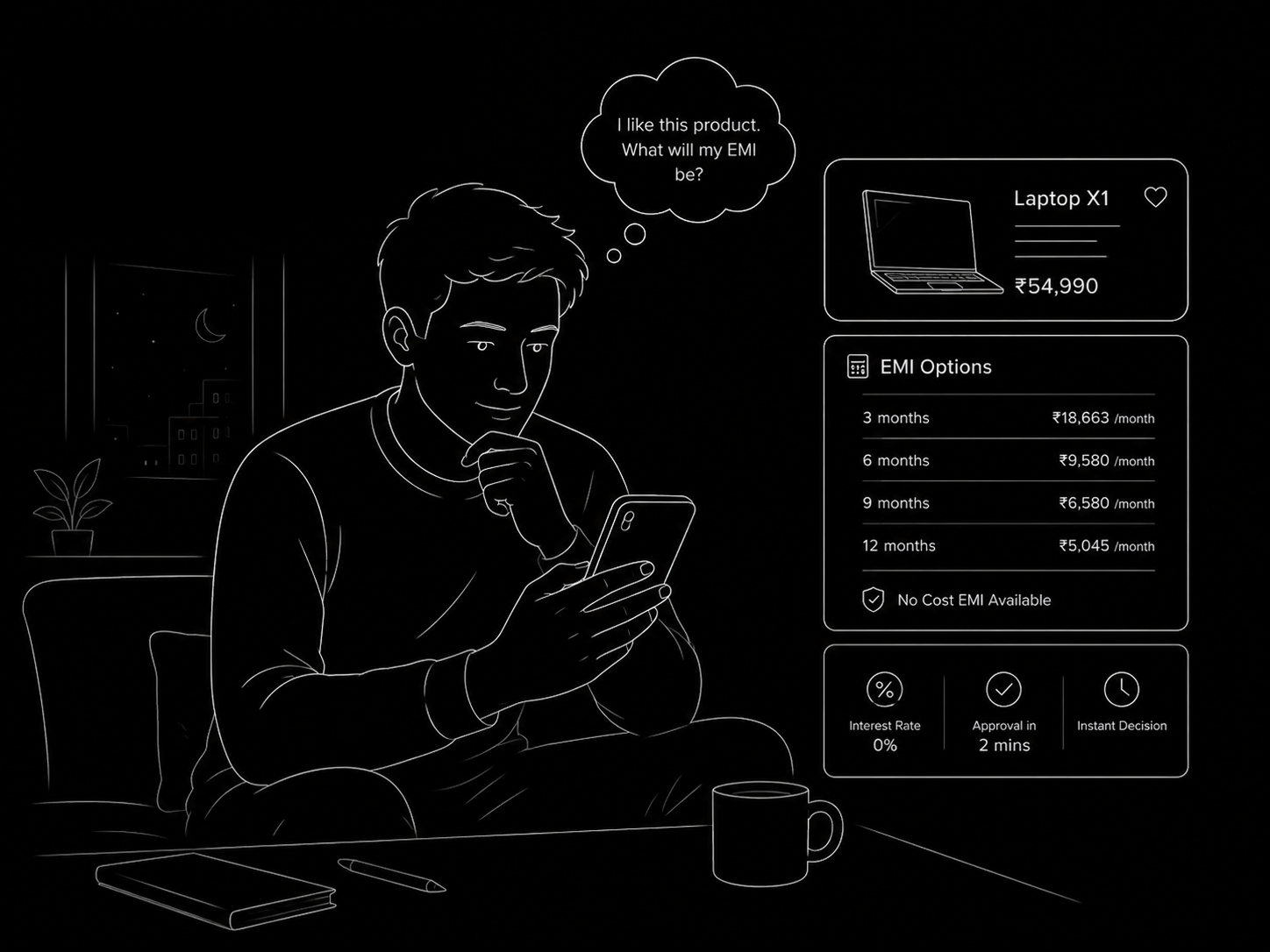
The Pre-Visit Researcher
Who they are: A customer who has identified a product they want to buy and wants to understand their EMI options before committing to a store visit.
What they need: Browse without friction. See real offers. Save plans they like. Share an offer with a family member for a second opinion. Optionally, request a callback from the store to negotiate on price or confirm stock.
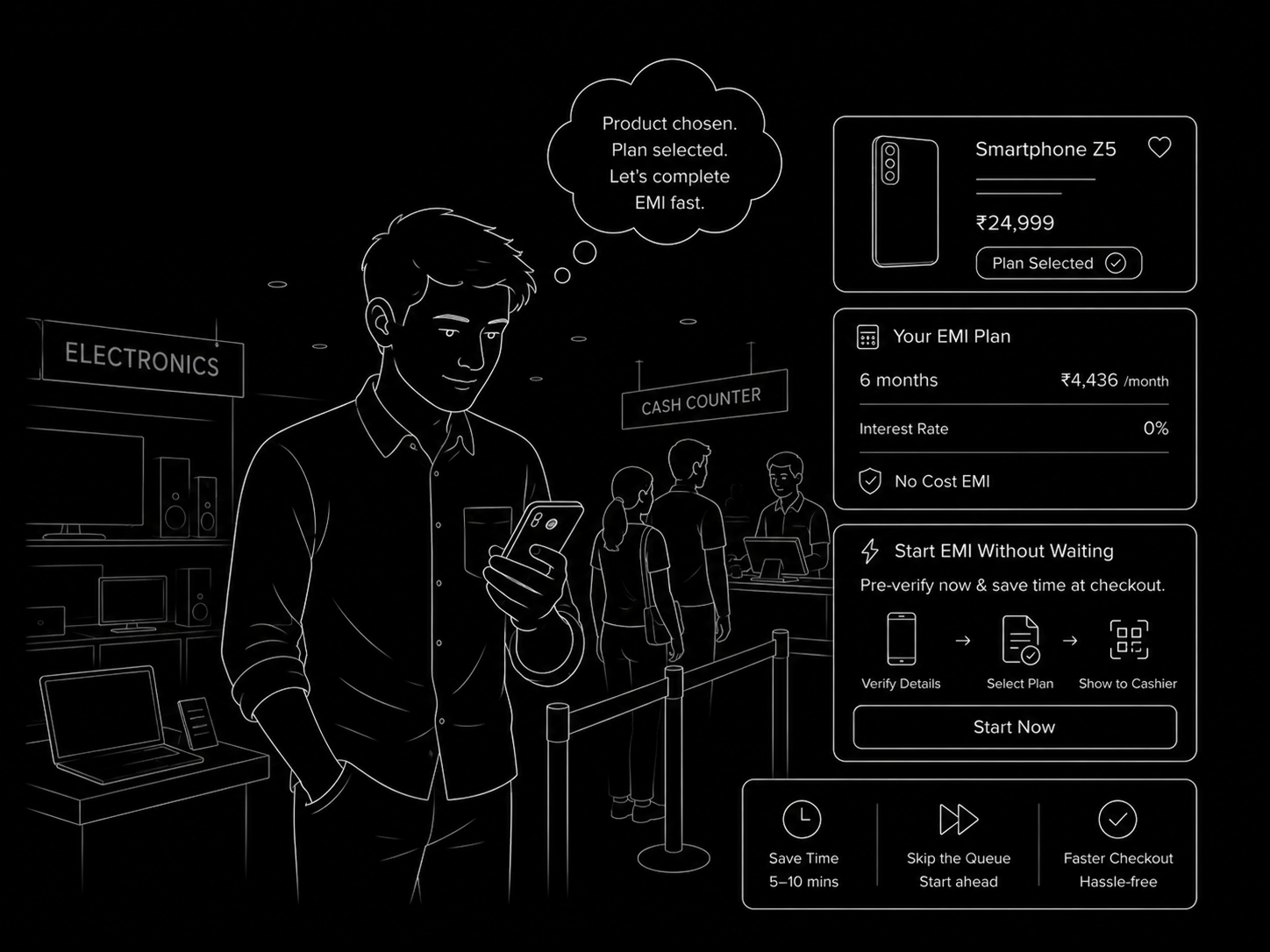
The In-Store Queue Buster
Who they are: A customer who is already in the store, product in mind, plan selected. They don't want to wait to start the EMI transaction from scratch with the cashier.
What they need: Generate a Purchase QR from their phone that pre-loads the product, plan, bank, and tenure on the cashier's terminal.
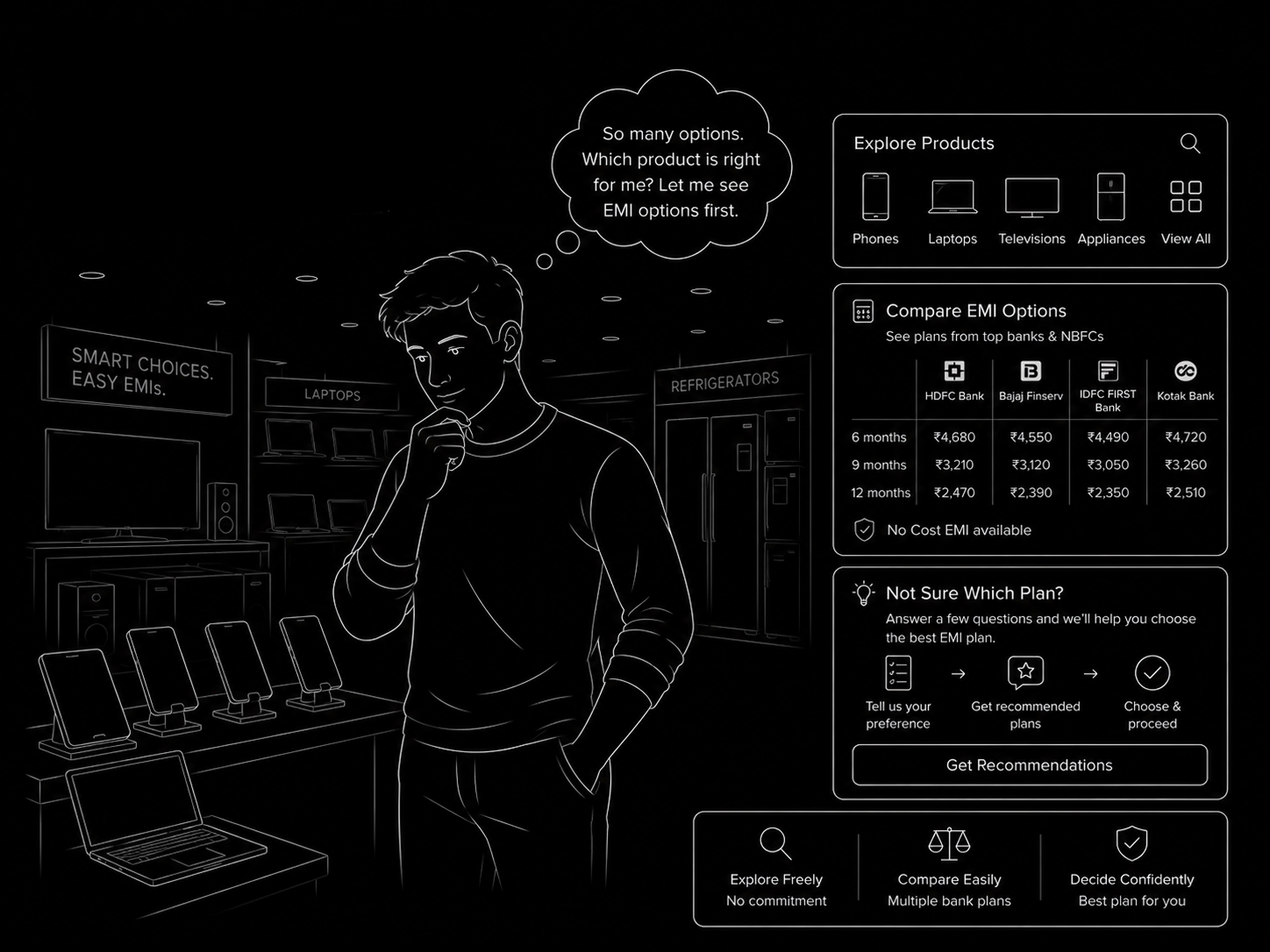
The Undecided In-Store Browser
Who they are: A customer who walked into the store without a fully formed plan. They're looking at products, they're open to EMI, but they haven't picked a bank scheme.
What they need: Quick product lookup, offer comparison, and a path to either escalate to the agent (via QR handoff) or ask a quick question without holding up the queue.
06, Service Design
Customer Journey, Service Blueprint
Five swimlanes across six shared trunk stages and three action branches, every touchpoint from pre-entry to QR checkout, callback, and async chat, mapped end to end.
D2C mWeb platform · QR → POS handoff · Callback via DID · Async chat via EMI World merchant app
| Customer Journey Trunk, Shared Across All Branches | ⬡ Branch A, Generate Purchase QR | ◈ Branch B, Request Callback | ◎ Branch C, Ask Quick Questions | Resolution | |||||||||
| 01 Pre-Entry | 02 Entry & City | 03 Home & Product Discovery | 04 Offer Discovery | 05 Offer Customisation | 06 Summary Screen | 07A QR Generation | 08A POS Checkout | 07B Callback Request | 08B Merchant Call | 07C Question Submit | 08C Merchant Response | EMI Picks & Order History | |
| Physical Evidence | Digital Brand / merchant ad creative (social, display, in-app) or direct URL in browser | Screen Splash screen (brand logo if context active) Location permission dialog City list / auto-detected city Merchant selector OTP screen (if gated action) | Screen Home: brand hero banner, OEM logos, category chips, featured products, search bar Product catalog grid (image-first, consumer names, SKU secondary) Brand scheme selector Search overlay | Screen Product detail, price + “Price is indicative” chip Store context (name + edit pencil) Payment mode tabs: Credit / Debit / Cardless / UPI Bank offer cards (No Cost · Max Savings · Instant · Cashback · Low Cost) Filter chips · Compare bottom sheet | Screen “Customise Purchase” screen Protection plan card (CHOICE badge, One Assist, 24M ADLD) Trade-in option (collapsed by default) Running total footer bar Skip button (top right) | Screen Summary, product image / name / SKU Plan breakdown (collapsed / expandable) Cashback strings · Effective price Store name + address + distance 4-CTA zone: Generate QR · Callback · Ask · Save | Screen QR modal (bottom sheet): – Store name + distance badge – Product + offer summary – NO COST / rate badge – Large QR code – 6-digit fallback code – “Scan EMI QR on POS” instruction – Pine Labs wordmark | Terminal POS terminal, pre-loaded transaction (product · plan · bank · tenure) Price confirm / update prompt Card dip prompt Screen Payment success intermediate screen (customer phone) Order in Transaction History (Pending → Successful / Failed) | Screen Callback bottom sheet: – Store manager name + photo – Assurance: “your mobile number is not shared” – Name field (pre-filled from profile) – Time slot: Today / Tomorrow, “Anytime” default – Consent line · Submit CTA | Phone Incoming call from virtual (DID) number Customer does not see merchant’s real number Screen (Optional) return to app → Summary → Generate QR | Screen Chat widget: – Pre-defined question chips – Free text input (200-word limit) – “7 days to expiry” callout – “Request Callback instead?” CTA – “Pay at Store” (QR) alternative | Notification Push notification: “Store manager replied” Chat thread with merchant response visible Screen (Optional) customer returns to summary → QR or Callback | Screen Your EMI Picks (hamburger menu): Pick cards, image · plan summary · store · intent tag Tags: Saved · QR Generated · Callback Requested · Chat Started Near-expiry amber indicator “Showing picks in the last 7 days” callout Transaction History: QR-generated orders · status (Pending / Successful / Failed) |
| Customer Actions | Sees brand / merchant ad creative Taps deeplink or types URL directly into browser | Grants or denies location access City auto-detected or manually selected Reviews pre-checked merchant stores Proceeds (with or without login) | Browses OEM brand logos or taps category chip or searches by product name / model or taps Featured Product Taps product card → selects store from nearby list (If multi-scheme brand) selects scheme type | Selects payment mode tab Applies bank / “No Cost” / “Instant” filter Optionally selects 2 offers → opens Compare panel Selects bank offer card Selects tenure → | Reviews pre-selected protection plan Accepts / modifies / adds second plan (max 2) Optionally expands Trade-in option Confirms or taps Skip → | Reviews collapsed plan summary Optionally expands for full breakdown Reviews store name + distance Optionally taps heart (explicit save) or share Chooses one of 3 forward actions ↓ | Taps “Generate Purchase QR” QR modal appears (bottom sheet overlay) Reviews QR + store context + offer Walks to store counter Holds phone screen towards cashier (If camera fail) reads out 6-digit fallback code | Dips / taps card at POS terminal Sees payment success screen on phone Views order in Transaction History (Successful) | Taps “Request Callback” Reads assurance line Enters / confirms name Selects preferred time slot (Today / Tomorrow) Submits → sees confirmation toast | Receives incoming call from virtual number Discusses price / stock availability with merchant Negotiates or confirms visit intention Optionally returns to app → generates QR to complete | Taps “Ask Quick Questions” Selects pre-defined question chip or types custom question (≤200 words) Submits Sees “Manager typically responds within a day” Optionally switches to Callback or QR path | Receives push notification (reply arrived) Opens chat thread Reads merchant response Optionally proceeds to Generate QR or Request Callback | Opens hamburger menu → Your EMI Picks Views 7-day shortlist with intent tags Taps pick card → summary screen restored with full context Takes next action (QR · Callback · Chat · Re-save) |
| Line of Interaction | |||||||||||||
| Frontstage Staff Actions (visible to customer) | No staff contact | No staff contact | No staff contact | No staff contact | No staff contact | No staff contact | No contact during QR generation | Cashier at POS terminal: Scans customer’s QR using POS camera Views pre-loaded transaction on Payments App (product · plan · bank · tenure) Confirms price or updates if in-store negotiation occurred Guides card dip / tap Hands receipt | Async, push notif only | Store Manager / Admin: Calls customer from DID / virtual number (Customer sees virtual number, not manager’s real number) Discusses stock availability, price negotiation Confirms customer’s visit plan | Async, no real-time staff visible | Store Manager / Admin: Types and sends response via EMI World merchant app chat surface Response appears in customer’s chat thread (visible to customer) | No staff contact |
| Line of Visibility | |||||||||||||
| Backstage Staff Actions (invisible to customer) | Ad platform serves creative context_id resolved → brand metadata, splash logo, featured creatives fetched | User classified as customer persona (not store agent) in PineOne New user record created (name · gender · optional photo) DPDP Act ’23 consent captured + encrypted PII stored OTP dispatched | OEM group resolved from deeplink params Featured product tags evaluated per OEM list OEM × merchant intersection validated If empty intersection: error popup triggered | Offer eligibility engine runs per product × store × bank × tenure “Max Savings” badge assigned to offer with best effective rate Scheme availability verified (card type · bin range) | Protection plan availability fetched for this product Trade-in valuation API called Pre-selection logic applies CHOICE tag to recommended plan Total recalculated on each plan change | Full plan calculation rendered: IRR · loan · upfront · deferred bullet Cashback strings fetched from config Effective price computed Store distance calculated (Haversine, if location access granted) | QR + unique ID generated Product + plan + store encoded in QR payload 7-day expiry timer starts Implicit save to EMI Picks → tag: QR Generated | QR validated against expiry Offer mismatch handling: if price updated by cashier → explicit cashier consent gate Transaction authorised via payment gateway Order status pushed: Pending → Successful / Failed Payment success dispatched to customer’s phone (intermediate screen) | Callback request persisted: Store ID · User ID · mobile · time slot · product · plan info Consent timestamp logged (DPDP, name-sharing consent record) Implicit save to EMI Picks → tag: Callback Requested Push notification fired to all admin + store manager roles for that store | DID / virtual number provisioned for outbound call Number masking: merchant calls customer via virtual number; customer’s real mobile not exposed Call interaction not logged in-app Lead entry prepared for Phase 2 merchant lead list | Chat thread created Deduplication check: if active thread exists for same product → redirect, no new thread spawned Implicit save to EMI Picks → tag: Chat Started Push notification fired to store admin / manager in EMI World app with product + plan context 7-day expiry timer starts | Merchant response persisted in thread Push notification dispatched to customer’s phone Thread expiry clock continues On expiry: thread removed; pick card filtered out of EMI Picks | Picks filtered by 7-day TTL on each load Near-expiry flag triggered at <24h remaining Transaction history fetched by user ID (QR-tagged only) Pick-to-summary context fully restored on tap |
| Line of Internal Interaction | |||||||||||||
| Support Processes & Systems | Ad PlatformDeeplink Resolvercontext_id DBCDN (creatives / GIFs) | Location APICity Config (enabled cities)Merchant–Store Hierarchy APIHaversine EngineOTP ServicePineOne Customer DBDPDP Consent LoggerPII Encryption (in-transit + at-rest) | Product Catalog APIOEM Group ConfigFeatured Tag System (Ops-controlled)Search Service (name + model)Brand Scheme ConfigStore Config API | Offer Fetch APIScheme Eligibility EngineBank Partnership DataMax Savings AlgorithmCompare Calculation ServiceBadge Assignment Logic | Protection Plan APITrade-in Valuation APICHOICE Pre-selection LogicPlan Recalculation Engine | Plan Summary APIIRR / Loan Computation EngineCashback String ConfigEffective Price CalculatorStore Distance APISession State Management | QR Generation ServiceQR Payload Encoding (product + plan + store)7-day Expiry TimerEMI Picks Write API | EMI World Pro → Payments App Bridge (QR handoff)QR Validation (expiry check)Offer Mismatch HandlerPayment GatewayTransaction Status APIOrder History Write APIPayment Success Push | Callback Persistence APIDPDP Consent Timestamp LoggerPush Notification ServiceRole-based Targeting (admin + store manager)EMI Picks Write API | DID / Virtual Number ServiceNumber Masking LayerEMI World Merchant App (notification + call trigger)Lead Log Prep (Phase 2 read-surface) | Chat / Messaging ServiceThread Deduplication Logic7-day Expiry TimerPush Notification Service (to store admin / manager)EMI World Merchant App (notification + chat response UI)EMI Picks Write API | Chat Delivery APIPush Notification Service (to customer)Thread Expiry Cleanup JobEMI World Merchant App (merchant response surface) | EMI Picks Expiry Engine (7-day TTL)Near-expiry Flag (<24h)Pick-to-Summary Context RestoreOrder History Read API (QR-tagged, by user ID)Transaction Status Poller |
07, Architecture
System Architecture
Three layers, how users arrive, what they experience, and the systems behind the curtain. Stitched together by context_id resolution and DID number masking.
Brand Ad
utm_source=brand_ad
context_id · OEM-scoped catalog
Merchant Ad
utm_source=merchant_ad
context_id · merchant-scoped catalog
Direct
emiworldpro.com/home
All enabled OEMs × merchants in city
Resolver
context_id DB
Validates campaign state · falls back to default home
Core discovery flow
Action branches from Summary CTA
⬡Branch A
Generate QR
In-store queue buster
QR → cashier scan → POS card dip
◈Branch B
Request Callback
Pre-visit lead · DID
Push → manager calls via virtual #
◎Branch C
Ask Questions
Async · 7-day thread
Push → merchant replies in EMI World app
♥4th CTA
EMI Picks
Cross-cutting save
Explicit heart · implicit on all 3 branches
Platform
PineOne Customer Platform
New record on signup · DPDP-compliant hard delete
Branch A
Payments App + POS Terminal
QR scan · transaction pre-loads on cashier device
Branch A
Payment Gateway
Card dip → status: Pending → Successful / Failed
Branch B
DID / Virtual Number Service
Outbound call routing · real mobile never exposed
Branch B + C
EMI World Merchant App
Push notifications · full product + plan context attached
Traffic
Ad Platform + CDN
Campaign creative · context_id metadata · CTA deeplinks
08, Design
What we built
Eleven screens across five core flows, each interaction refined through rapid prototype testing with real users.
Product walkthrough, EMI World Pro
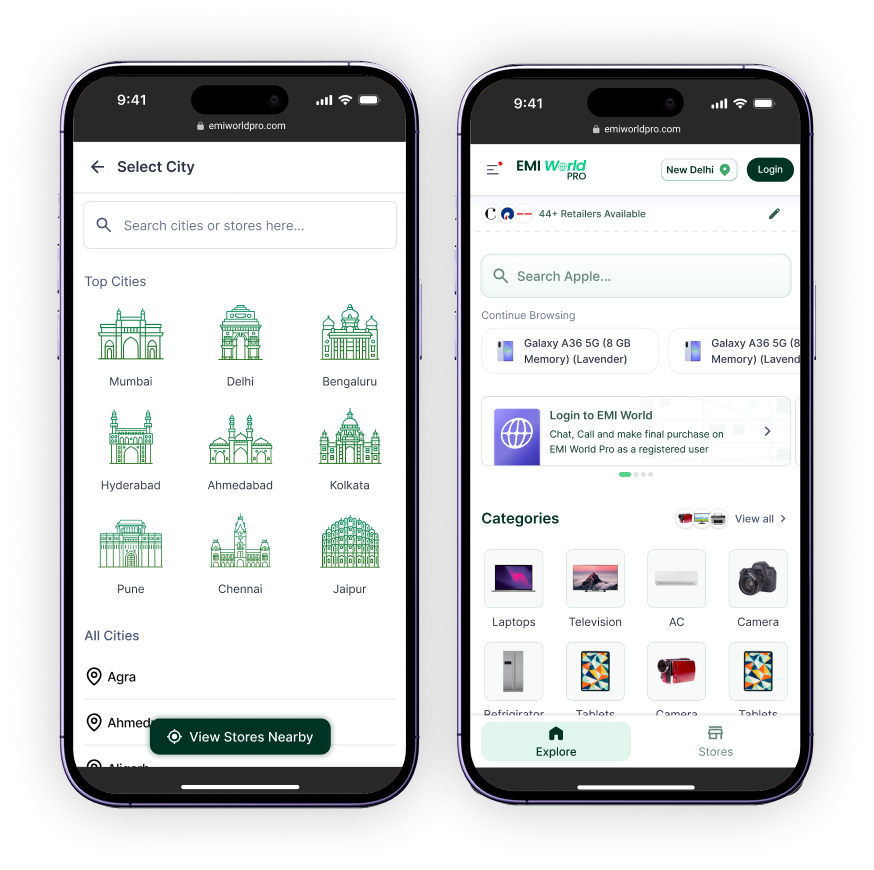
New Frictionless Login
The login UI for EMI World Pro fashions a frictionless and intent-driven flow. Here the user can decide when and how much information they want to divulge before finalising their purchase decision.
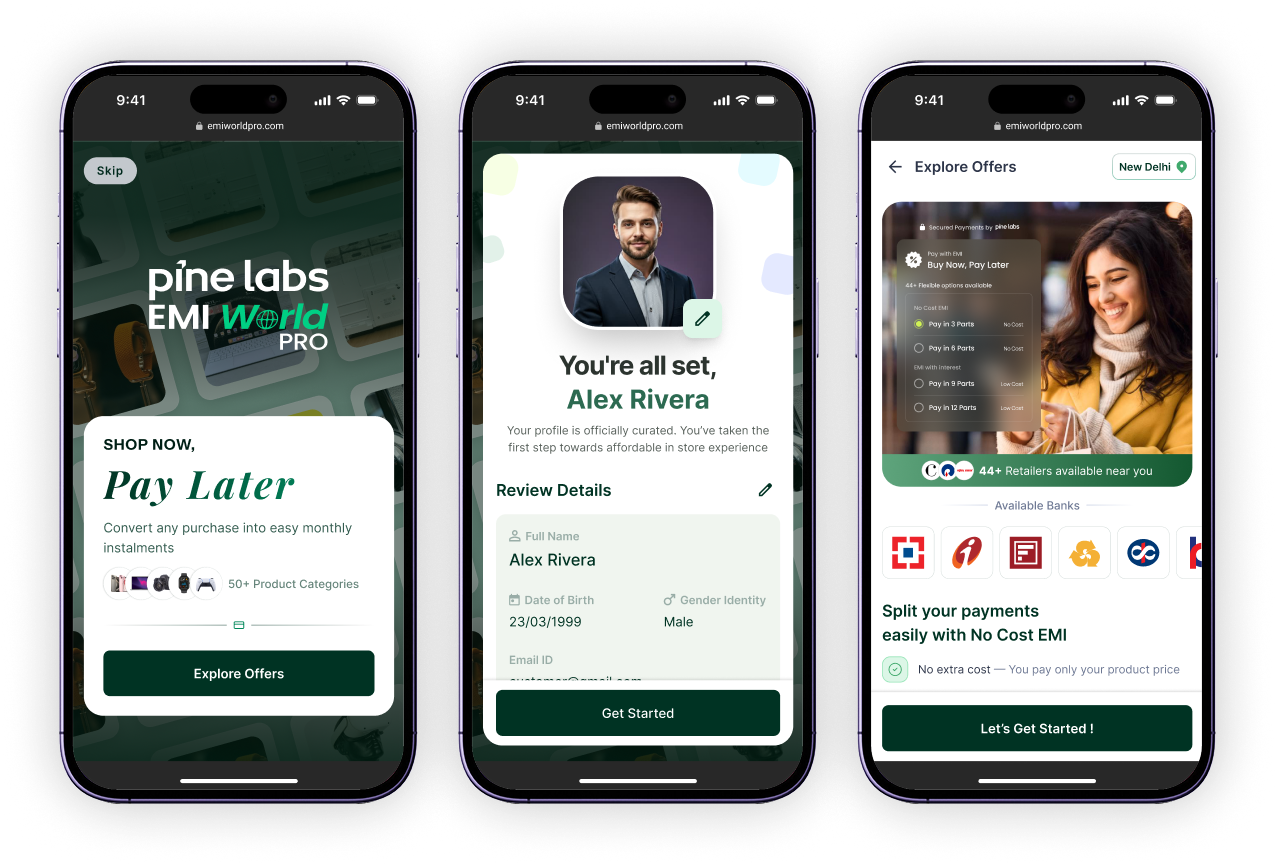
Context Dynamic Experience
Home page caters a dashboard centred around product discovery, improving upon the existing B2B architecture, yet dynamically catering to a context-based experience nudging users on the basis of actions required.
- 01
No location allowed
If a user chooses not to share location access, an intuitive fallback is present to choose on the basis of cities, as well as smartly nudging users to share access for a localised experience.
- 02
User entry without login
Easy transition between both options, allowing exploration before commitment to signup.
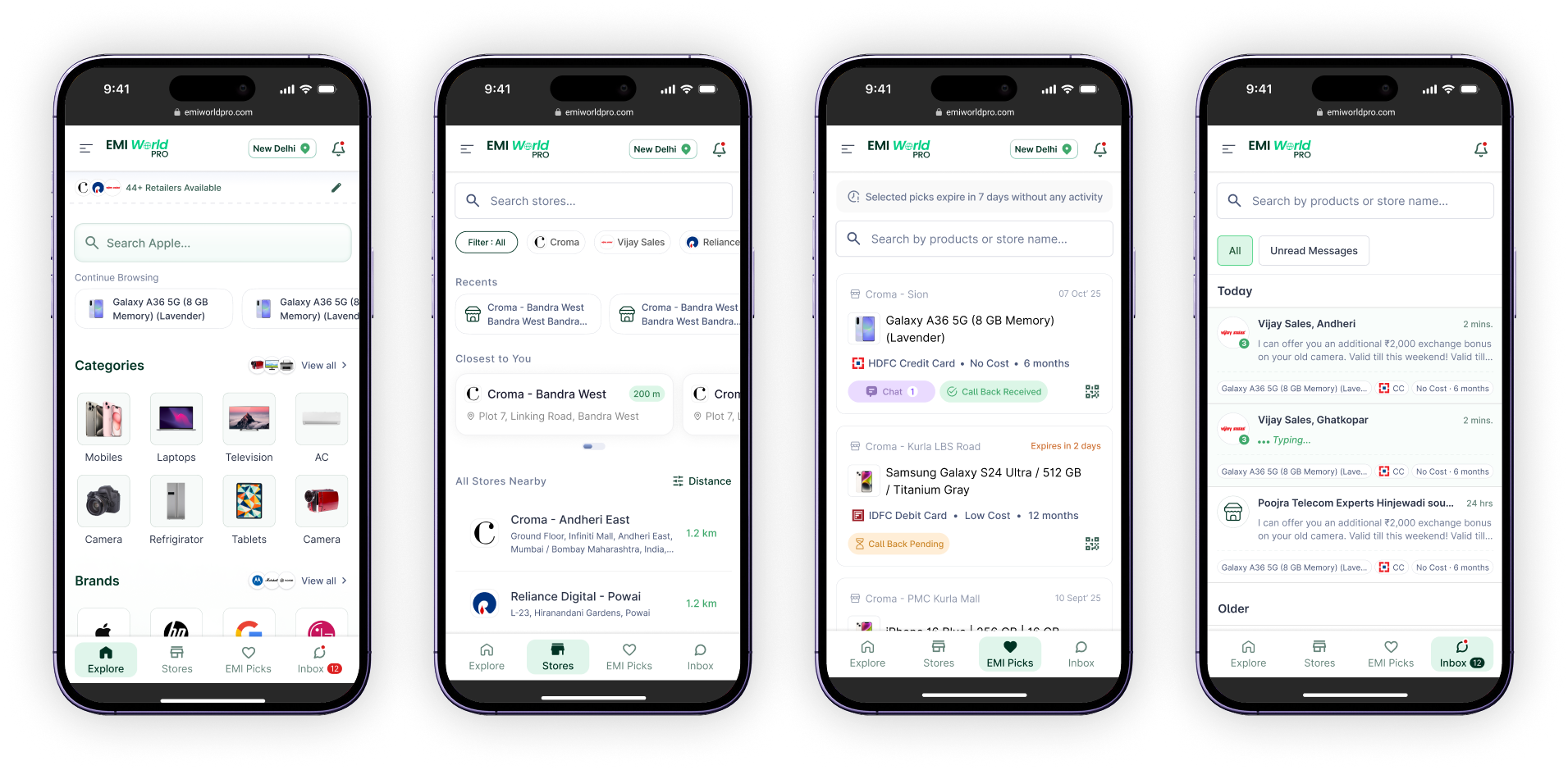
Segmented Navigation
The design is based on the existing EMI World UI design system with customer-centric usability tweaks. Persistent bottom navigation caters to multiple action-oriented experiences, maximising the scope to browse or execute on decisions as intuitively as possible.
Home
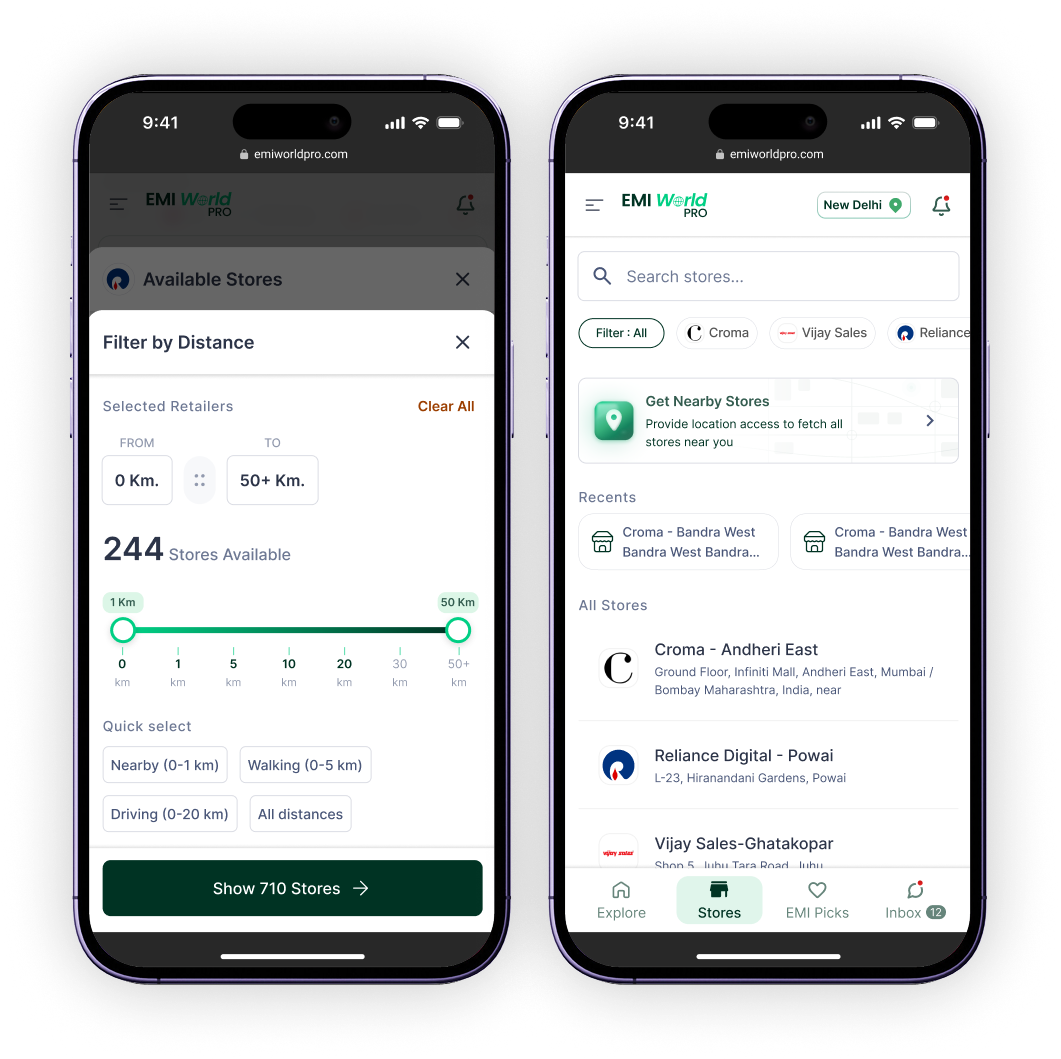
Widget to browse and explore products on the home page itself. Persistent merchant and store selection visible on top with a widget to directly explore retailers.
Stores
Caters a retailer → store discovery first approach. Filtering on the basis of distance compensates for inaccuracy in data and lack of map support for discovery.
EMI Picks
Aids a wishlist over the platform that allows users to keep offer selections retrievable. Allows a gestation period to finalise the decision and supports quick retrieval at time of purchase.
Inbox
Features an active chatbox where necessary information is tagged for quick recall. A global search allows the user to search on the basis of store and product.
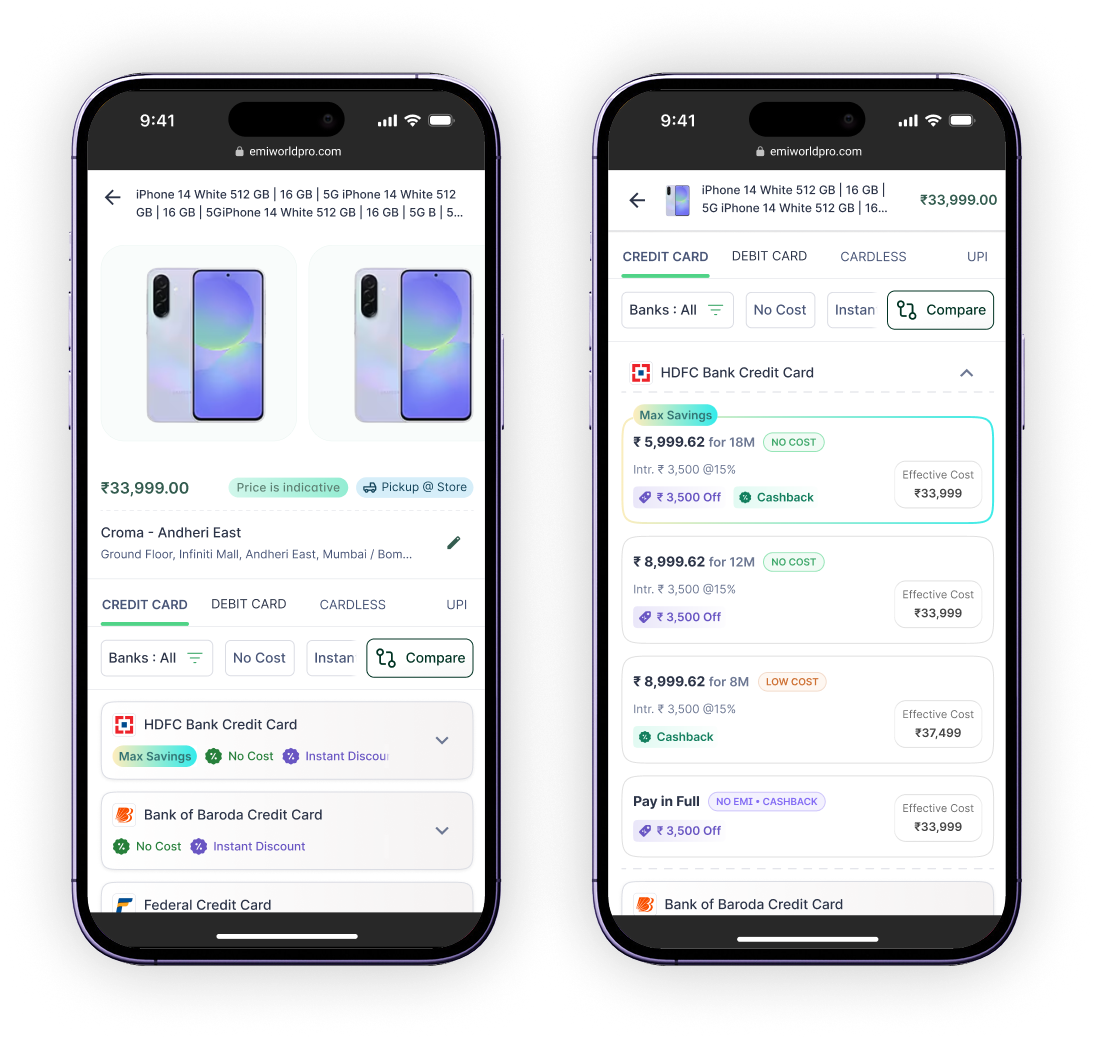
Offer Discovery Redefined
- 01
Retail-centric cues are shared to customer beforehand with flexibility to explore different stores
- 02
Easy transition between both options
- 03
Issuer UI tiles share a higher contrast for distinct user perception
- 04
Offer tile now segments information, providing effective cost as the right anchor for quick comparison
- 05
Colour-coded benefits for user recall and a much more highlighted max savings offer tile
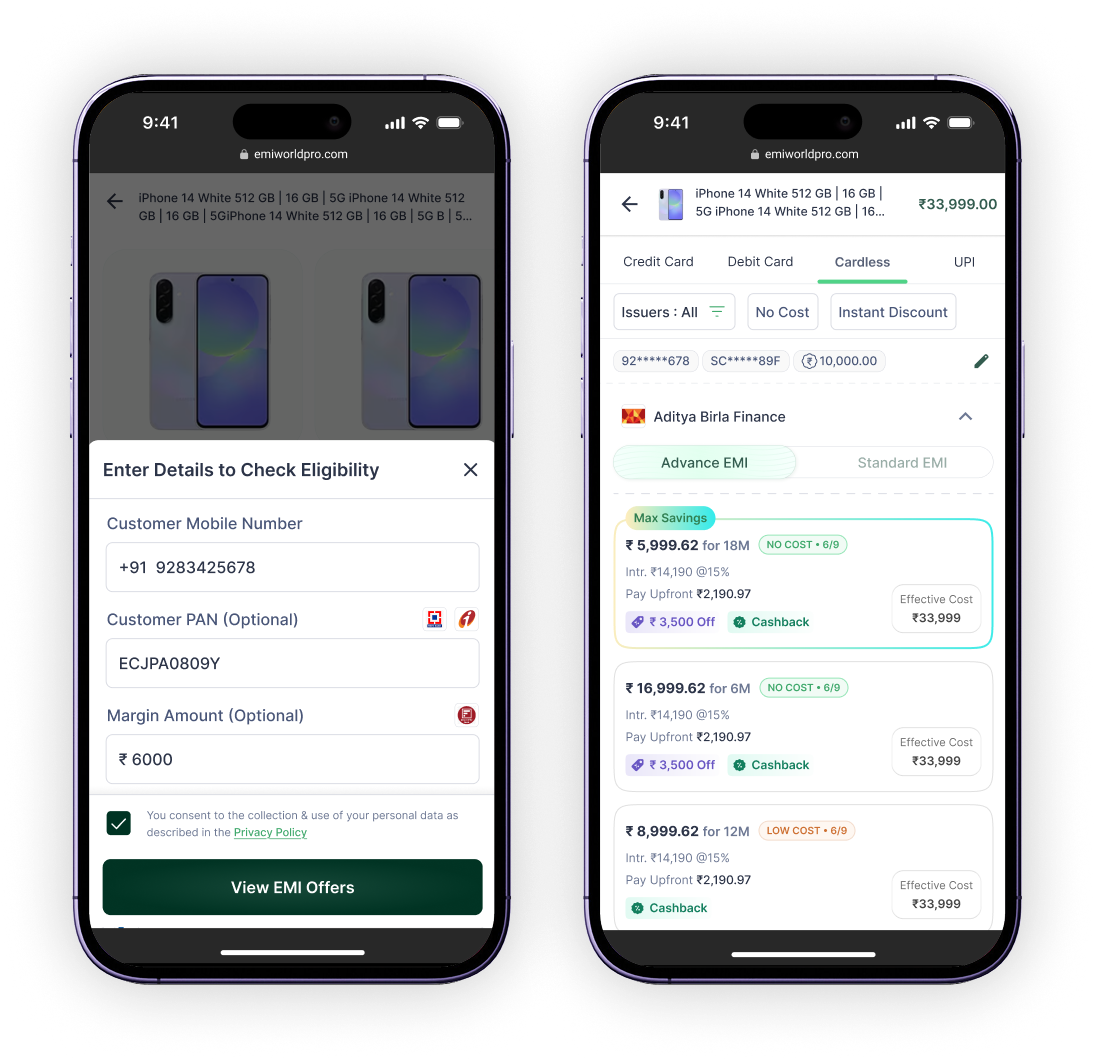
Cardless Simplified
- 01
Eligibility window stays common for the whole pay mode
- 02
Easy transition between both options
- 03
Upfront amount highlighted across EMI offer tiles
- 04
Advance and standard EMI tabs hold light visual weight for easy focus in a numerically heavy screen
- 05
Persistent section for user details and convenience in editing those details
Distance Based Filtering
- 01
Filter on the basis of distance compensates for low features in MVP and inaccurate data
- 02
Easy transition between both options
- 03
Allows the user to view stores around their current location, independent of the city selected
- 04
User can type, toggle, or filter their choice of area and distance they want to cover
- 05
In case location access is denied, a smart nudge for location sharing persists throughout the experience
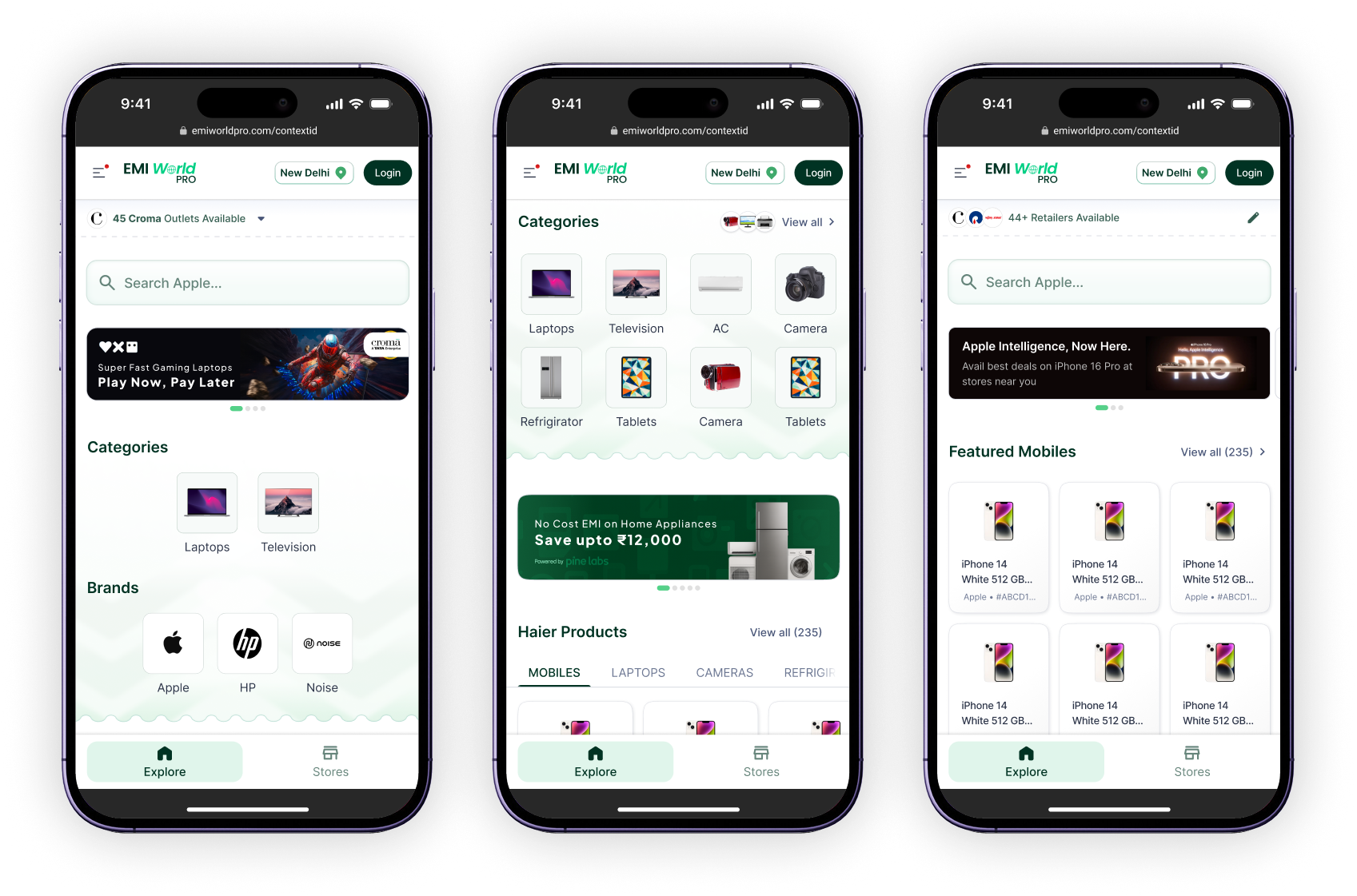
Cater to Context
When a user is redirected from an offline or online advert, a context ID is shared for the generated deeplink. This experience skips the user directly to product discovery and stays dynamic to context.
Retailer Specific Ad
User can browse through categories and brands limited via the context built inside the deep link. The whole experience sticks to retailer-specific utilities and discovery.
Brand Specific Ad
User can browse through categories of products across retailers and nearby stores. Brand discovery is hidden throughout the flow to maintain context integrity.
Product Specific Ad
User is limited to the product and selected brand only, with all variants in scope available in the featured widget. Resets to default after the user takes final action.
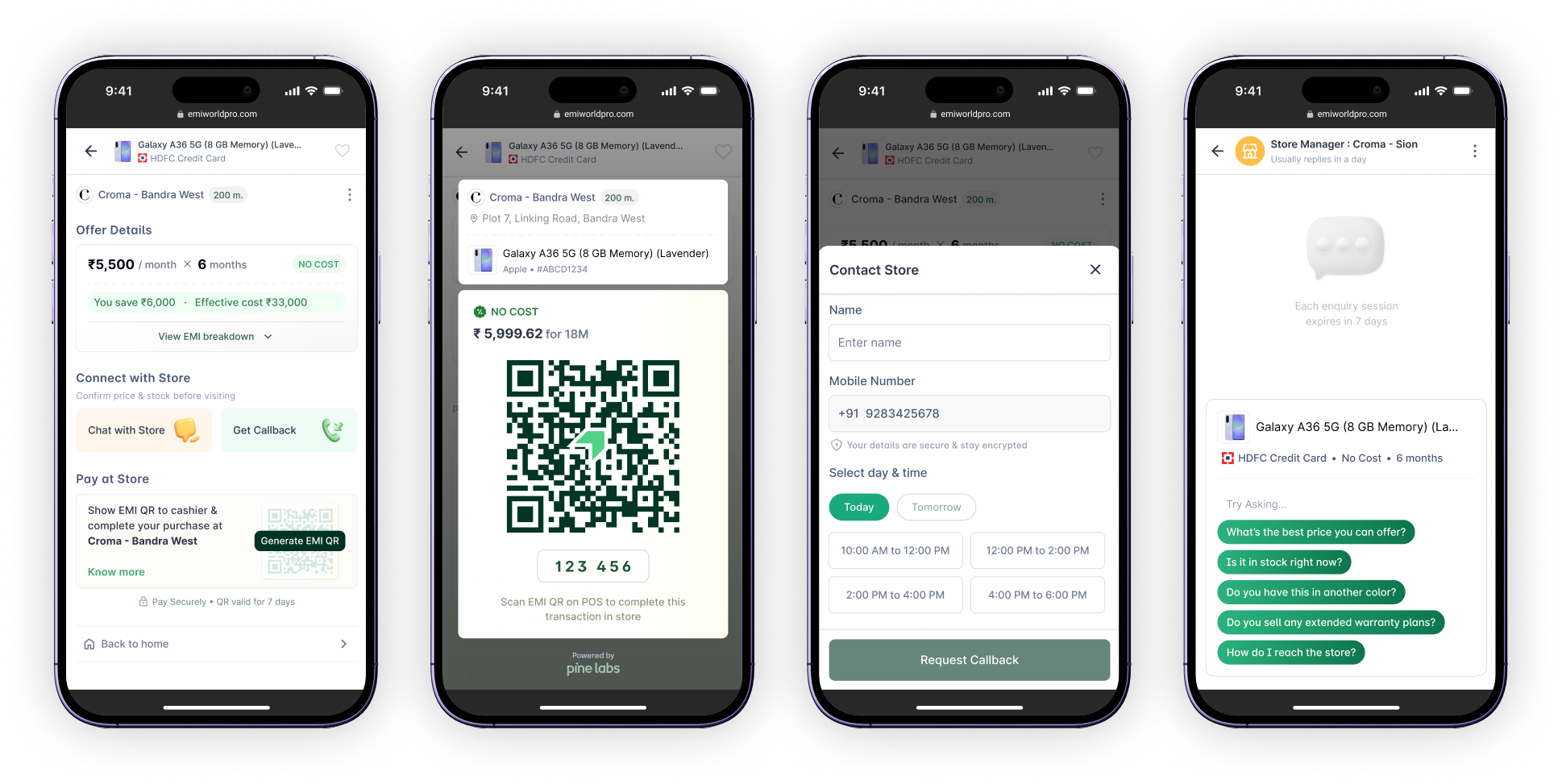
Intent Oriented Actionables
The key screen in the customer journey is where the customer decides to proceed with one offer. Actions can be multiple here, considering a deterministic approach to closing the purchase loop.
Checkout QR
A prominent feature that converts a prospect into a purchase transaction. Shares a unique code along with QR to prevent errors. Product, offer, and store details remain visible throughout checkout to build trust.
Request Callback
Requesting a callback remains simple with low scope for detailed choice. User can select between 2-hour slots for today or tomorrow, pursuing urgency and quick close of sale on both ends.
Chat with Store
Chat caters to quick conversation nudges. Product and offer context stays persistent. Store agent details and activity are clearly visible, with options to protect user privacy.
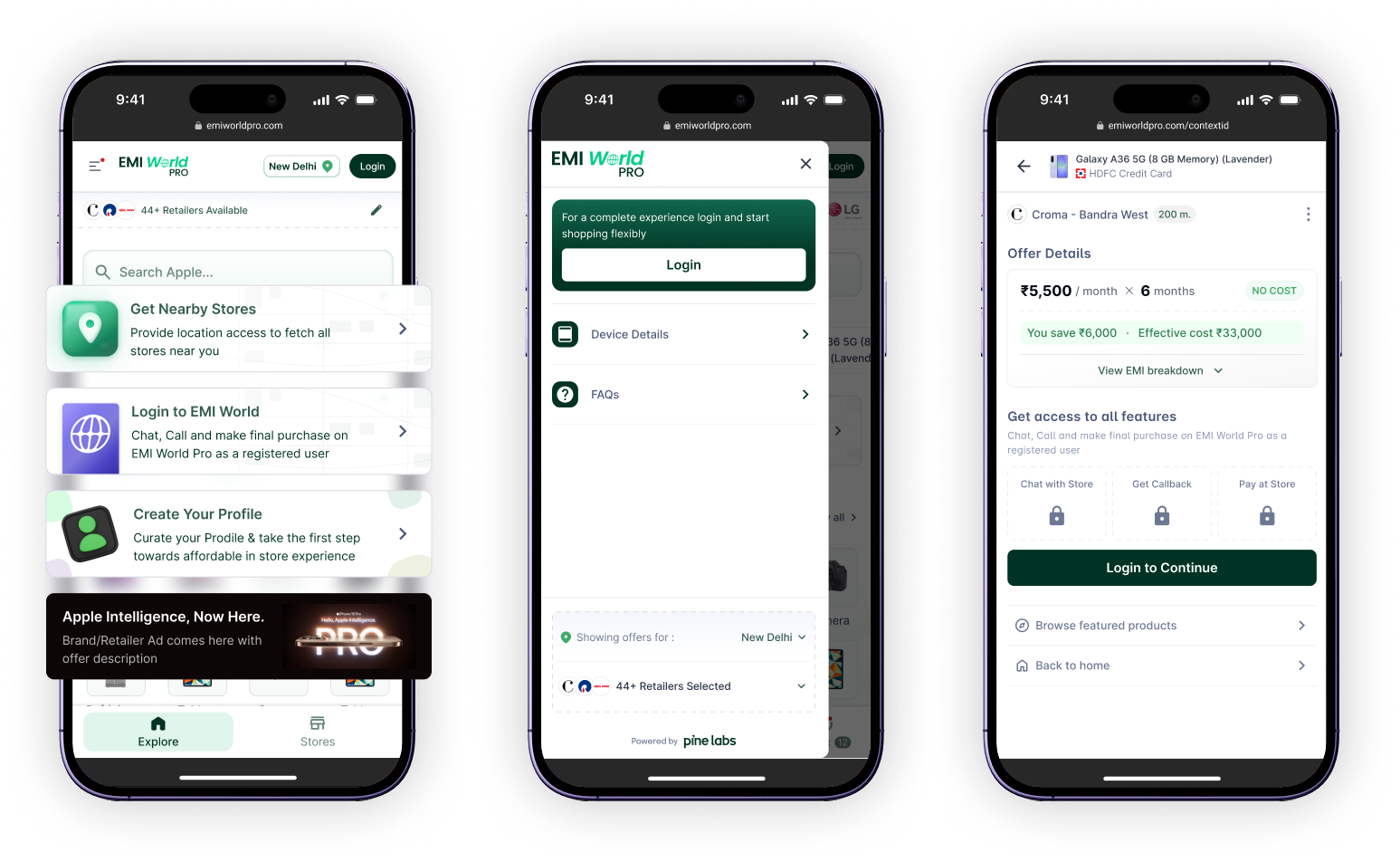
Smart Nudge to Enhance Experience
Persistent contextual nudges guide users toward actions that improve the experience without blocking their path. Each nudge is earned by understanding where users stall.
Location Access
Location access is a stakeholder preference. Without it, finding the right store among inaccurate data reduces the experience and increases drop-offs.
Login with Credentials
Login enables the user to act on their offer selection. Keeping the nudge persistent throughout is necessary, with smooth login or signup at the final stage after offer selection.
Profile for Personalisation
A personalised profile manages systems on both merchant and customer sides, giving name recognition and confidence in the offline space where manual intervention is present.
Retain Ad Context
As we launch, most cases address a state where the user comes from an advert context. Preserving that context through all states is critical to maintaining relevance.
Selection Retained and Notified
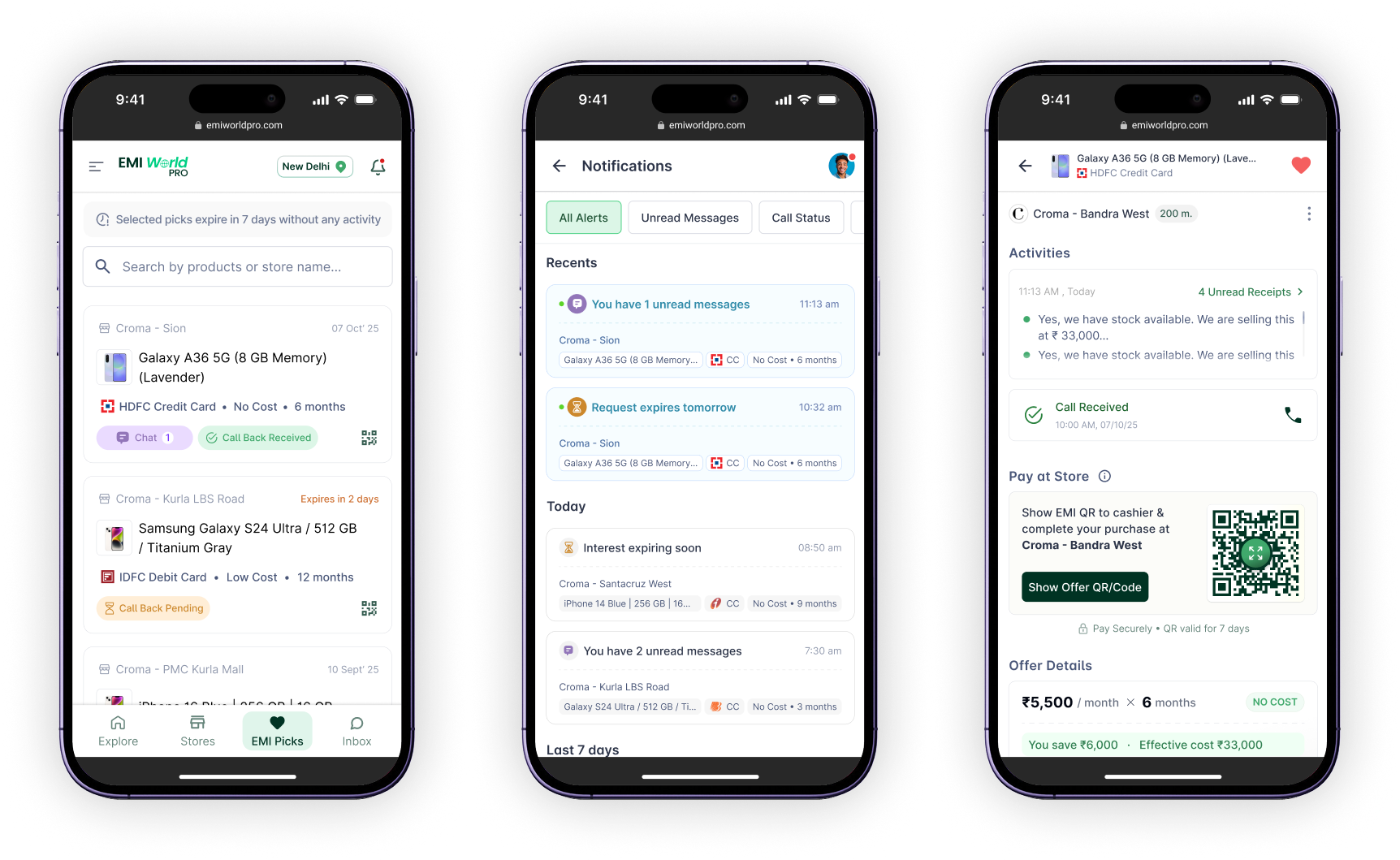
When an offer selection acts as a preference and lead engine for offline stores, retaining the preference and notifying of all activity around user actions becomes critical. It should also aid the final checkout while maintaining urgency to close the purchase.
EMI Picks
A collective UI where the user can see active picks with updates visible on the surface. The Checkout QR is easily retrievable through each tile itself.
Notifications
Customers are notified around 3 areas of update: calls, messages, and pick expiry. Each notification carries product, offer, and issuer context for quick identification.
Checkout Summary
Checkout summary shares updated call status; unread invoices are shown upfront yet progressively visible. The Checkout QR can be expanded or scanned directly from here.
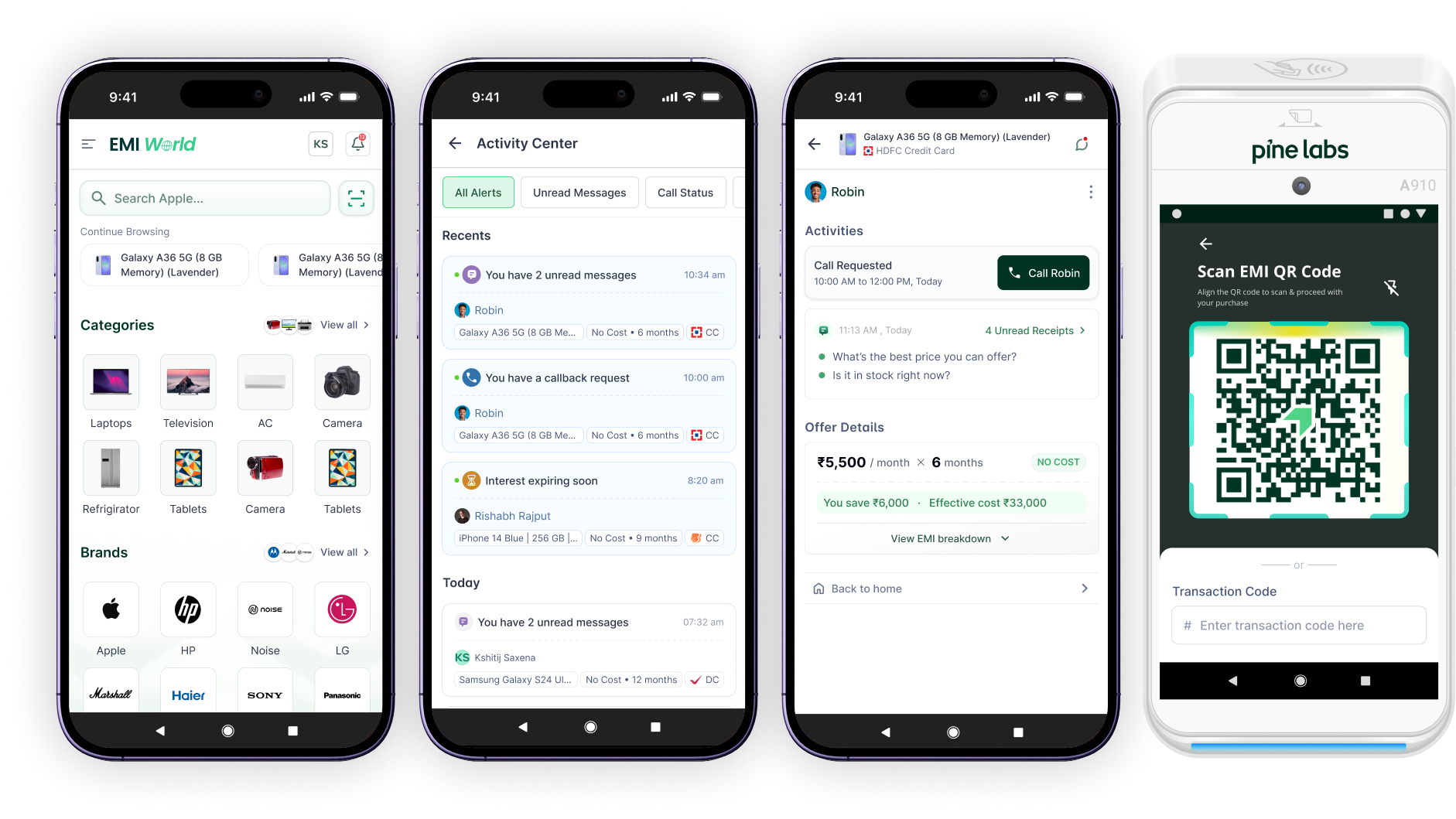
What Changes for Merchant?
Merchant architecture caters a notification centre to aid customer reach and taking action at the right time for a prospective lead. The lead summary allows a CTA to call customers via masked digits ensuring privacy. On the POS, the Payments app caters a node to scan the EMI QR and proceed simply with the transaction.
09, Validation
What testing showed
User testing
74% TSR
Achieved among a sample of 44+ participants across 3 task flows
A/B test
88%
Preferred new offer tile vs old offer tile in A/B test
Prototype cycles
64%
Checkout conversion achieved over 3 rapid prototyping cycles
Projection
20Mn.+
Projected direct consumer traffic
Projection
21Mn.+
Expected Annual GTV
Projection
20 Mn. Annually
Expected Incremental Revenue
10, Roadmap
Proposed for Next Phase
More work
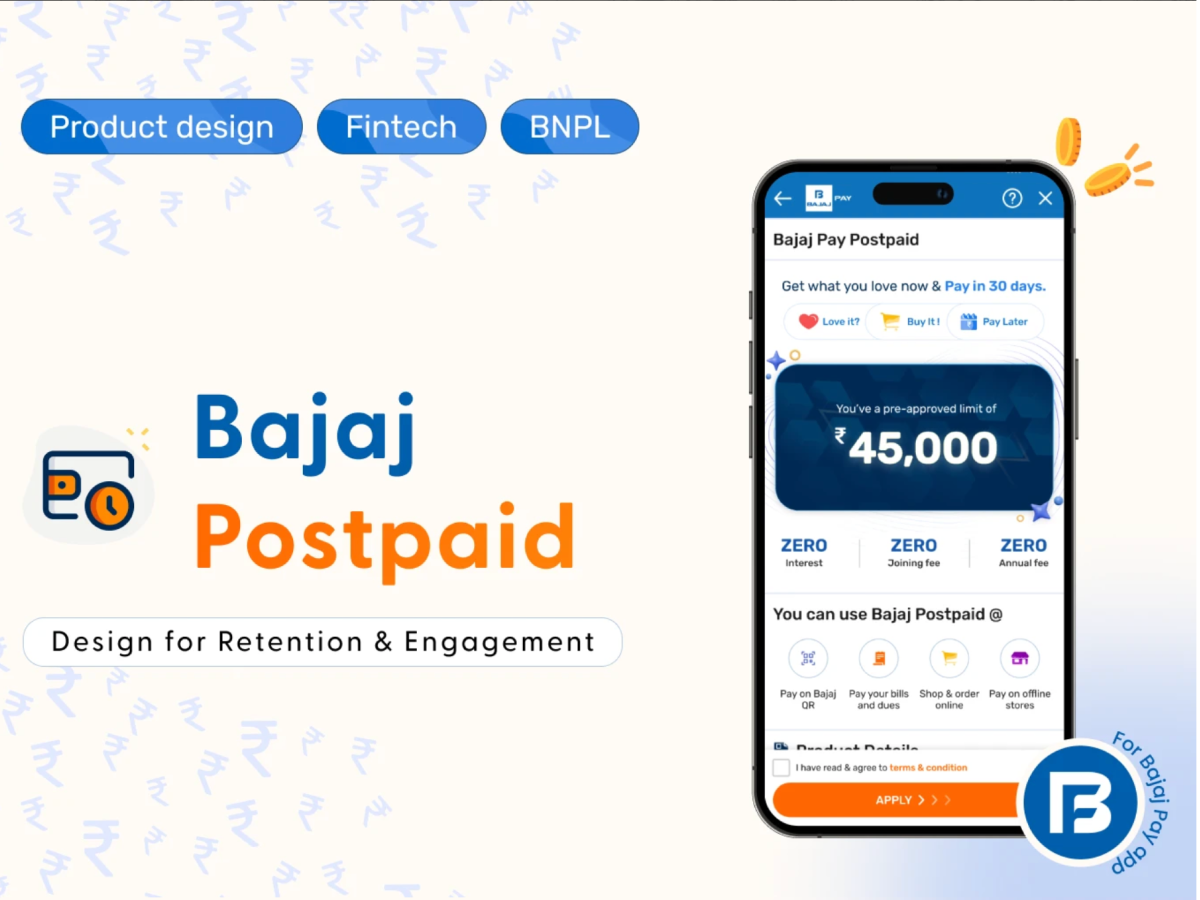
Bajaj Postpaid : BNPL Product Case study.
Fully digital lending product integrates on Bajaj Pay app. TSR 66% achieved.
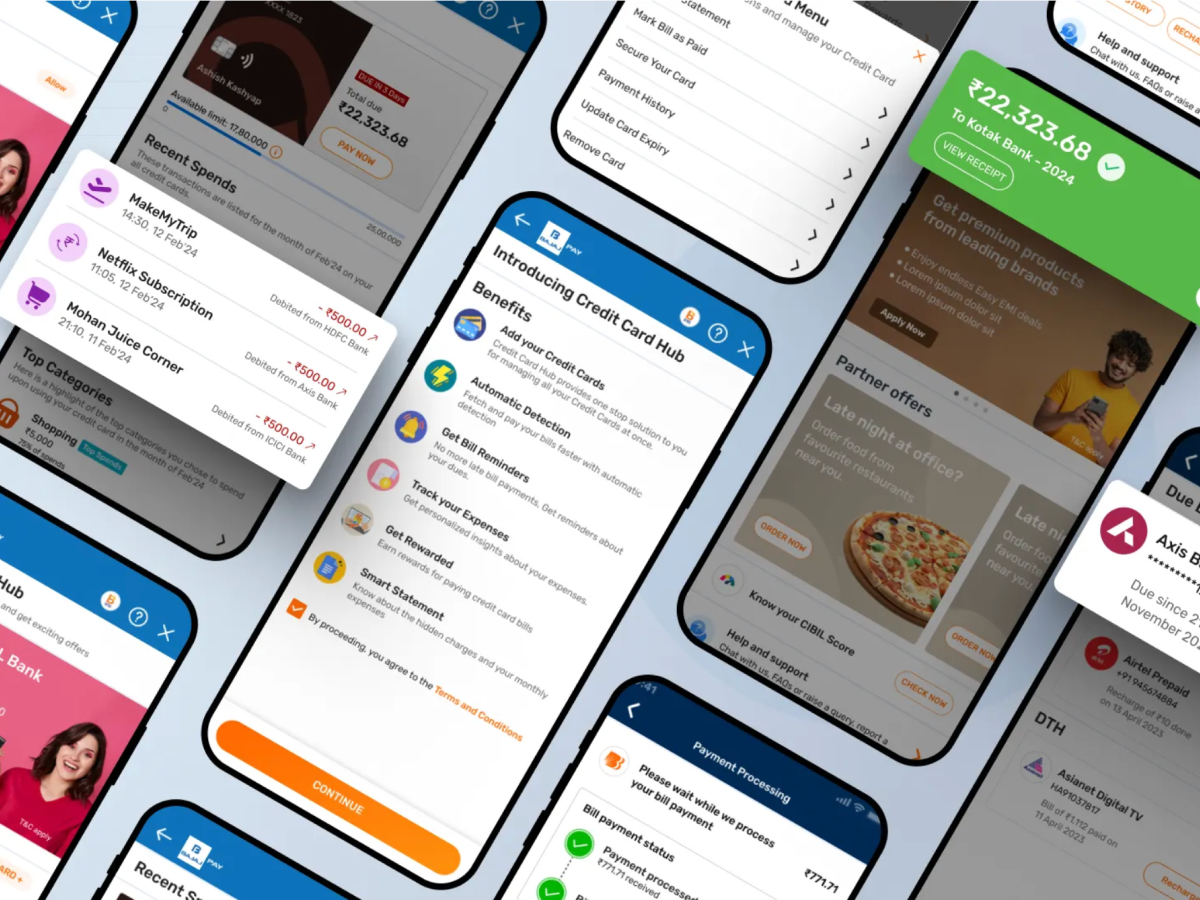
Rethinking Credit Card Bill Payments.
Redesigning Bajaj Pay Credit card hub for increased retention and engagement. ₹36.6Cr. GMV in 3 months.